












Dashboard
The Dashboard shows at a glance whether assistants can use your shop and how much they do.
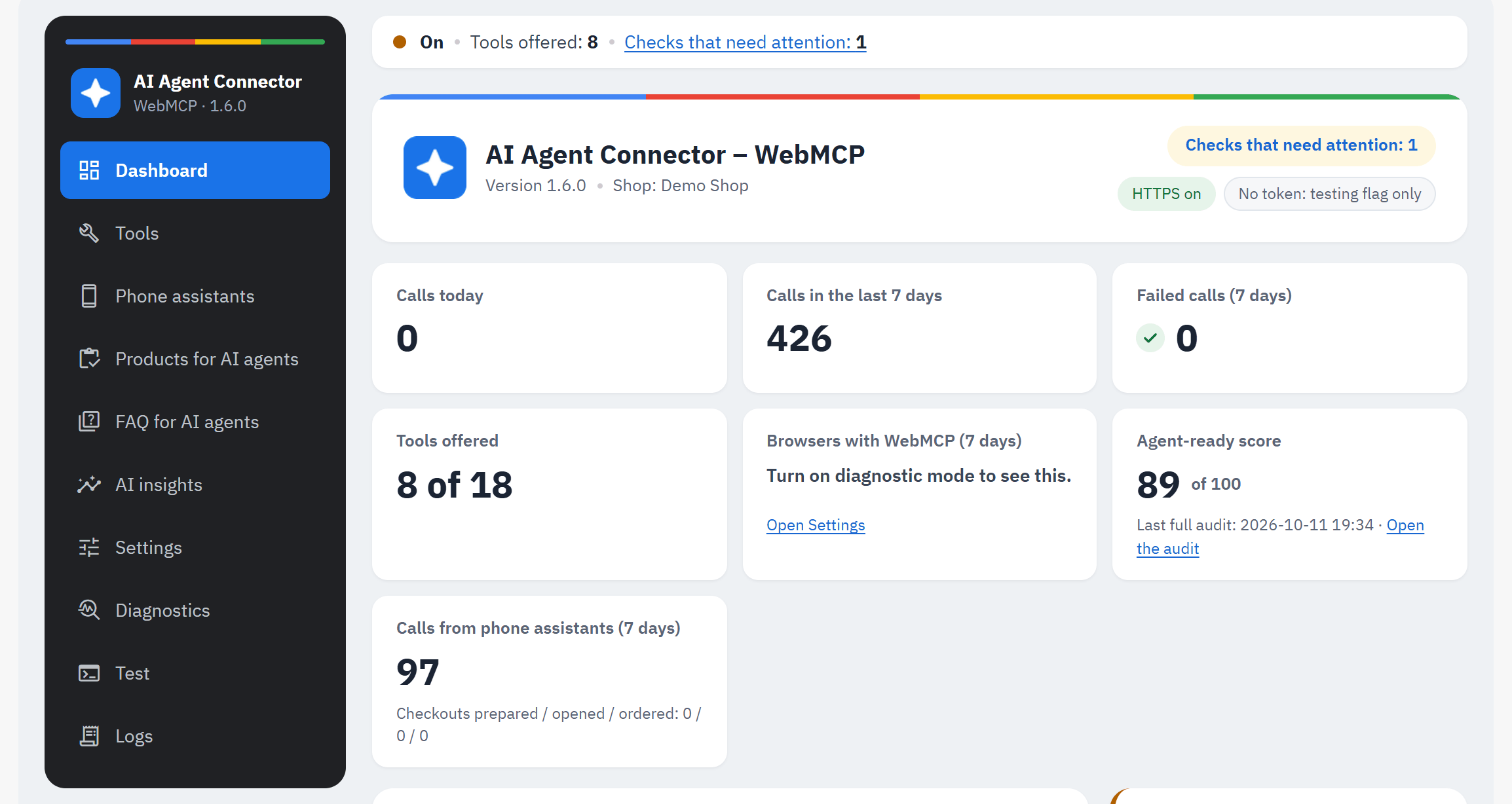
- The module's menu: Dashboard, Tools, Phone assistants, Products for AI agents, FAQ for AI agents, AI insights, Settings, Diagnostics, Test, Logs. Until the setup is finished, the Setup guide is listed first.
- The status line, at the top of every section: the module's state in this shop (On / Off), the number of tools offered and, when there are any, a link Checks that need attention: N to Diagnostics.
- The module's name, version and shop, with badges: the state ("On, tools offered: N", "Off in this shop", "On, but no tool is offered" or "Checks that need attention: N"), HTTPS ("HTTPS on", "HTTPS not on every page", "No HTTPS") and the origin-trial token ("Token valid until …", "Token expired", "Token not valid for this shop", "No token: testing flag only").
- The figures:
- Calls today, Calls in the last 7 days: tool calls by assistants, on the storefront and from phone assistants;
- Failed calls (7 days): calls that ended in an error of the shop;
- Tools offered: tools switched on, of the tools available;
- Browsers with WebMCP (7 days): how many storefront pages were opened in a browser that offers WebMCP. It needs Diagnostic mode (Settings); without it the tile says "Turn on diagnostic mode to see this.";
- Agent-ready score: the score of the last full audit, "of 100", with Open the audit (or "–" and Run the audit before the first one);
- Calls from phone assistants (7 days), with "Checkouts prepared / opened / ordered".
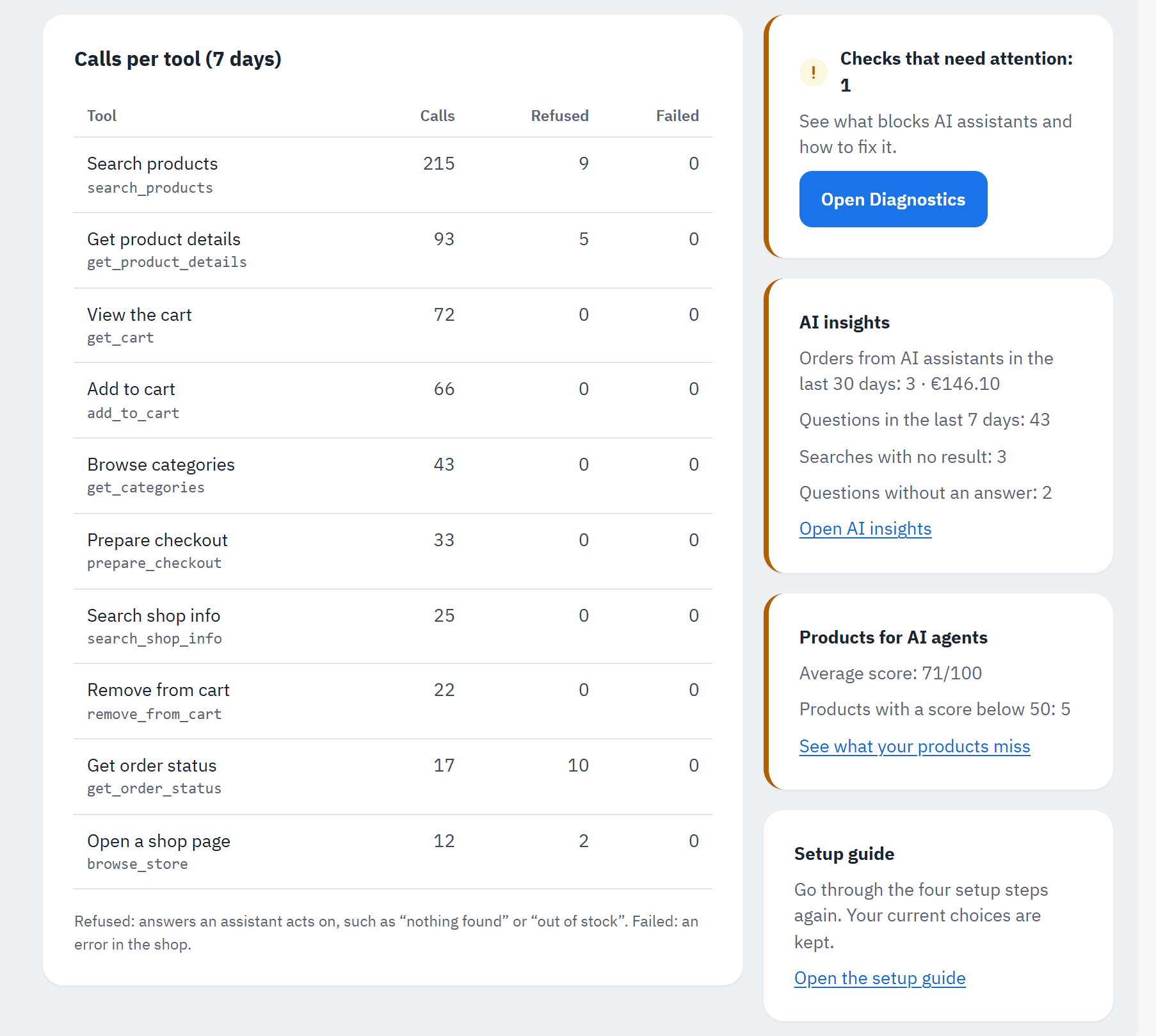
- Calls per tool (7 days): for each tool the calls, the refused and the failed ones. "Refused: answers an assistant acts on, such as “nothing found” or “out of stock”. Failed: an error in the shop."
- The checks card: All checks pass, or the checks that need attention with Open Diagnostics.
- AI insights: the orders from AI assistants in the last 30 days with their revenue, the questions of the last 7 days, the searches with no result and the questions without an answer, with Open AI insights (see AI insights).
- Products for AI agents: the average score of your products and how many score below 50, with See what your products miss (before the first check: Check your product data; see Products for AI agents).
- Setup guide: go through the four setup steps again; your current choices are kept (Open the setup guide).
Test calls (both tabs of the Test page) are never counted in these figures: they show your buyers' traffic.
AI insights
The page AI insights shows what AI assistants bring your shop: first the Orders from AI assistants, per channel, then What AI agents asked, with the searches that found nothing and the questions your shop could not answer. The Dashboard's card AI insights sums both up, with Open AI insights.
Orders from AI assistants
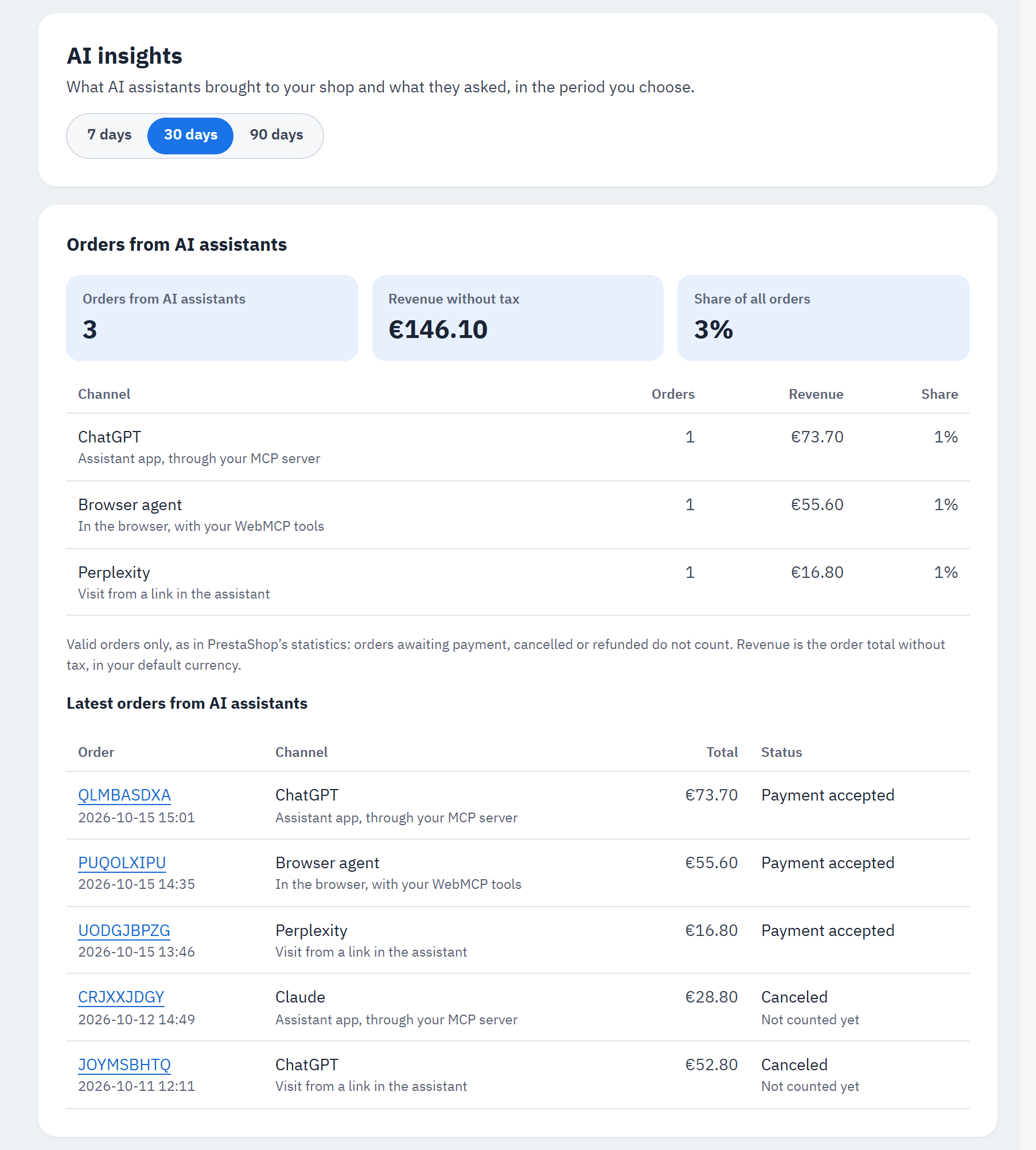
- The period, at the top of the page: the last 7, 30 or 90 days. The orders and the questions below both follow it.
- The figures of the period: Orders from AI assistants, Revenue without tax and Share of all orders.
- One line per channel: the assistant, how it reached your shop, its orders, revenue and share.
- Latest orders from AI assistants: each order with its channel, total and status; the reference opens the order.
An order counts as an order from an AI assistant when an assistant built or touched its cart, in one of three ways:
- Assistant app, through your MCP server: a buyer shopped by talking to ChatGPT, Claude or another assistant app (see Ordering by phone);
- In the browser, with your WebMCP tools: an assistant in the shopper's browser used your tools, shown as Browser agent;
- Visit from a link in the assistant: the shopper came to your shop from a link in ChatGPT, Claude, Perplexity, Microsoft Copilot, Gemini or another assistant, or from a cart link an assistant gave them (see Cart links for AI assistants), and ordered within 30 days.
A cart that a verified AI agent browsed (see Verified AI agents) is shown as Verified AI agent browsing your shop.
When several channels touched one cart, the order goes to the last one, with one exception: a link from an assistant never takes an order away from the module's own tools. A buyer who filled the cart in ChatGPT through your MCP server and then opened the pay link still counts as an assistant app order.
Only valid orders count, as in PrestaShop's statistics: orders awaiting payment, cancelled or refunded do not. An order that is not valid yet is listed with "Not counted yet". Revenue is the order total without tax, in your default currency. With several shops, the page adds up the shops of the shop or group you have chosen in the back office.
Visits from AI links behind a page cache
Many shops use a page cache (a cache module, LiteSpeed Cache, Cloudflare and others), which answers a visit without PrestaShop and so without the module. So that visits from an assistant's link still count, storefront pages carry a small script while Count orders from AI assistants is on (not on the checkout pages). When a visitor arrives from an assistant, it tells your shop once per browser session which assistant it was: only the assistant's name or the link's host, never the page, and nothing at all for other visits. A shop without a page cache does not count such a visit twice.
What AI agents asked
Below the orders, What AI agents asked shows what assistants searched for in your shop, in a browser and from a phone: product searches and questions about your shop (delivery, returns, payment …). Only the words are kept, never who asked.
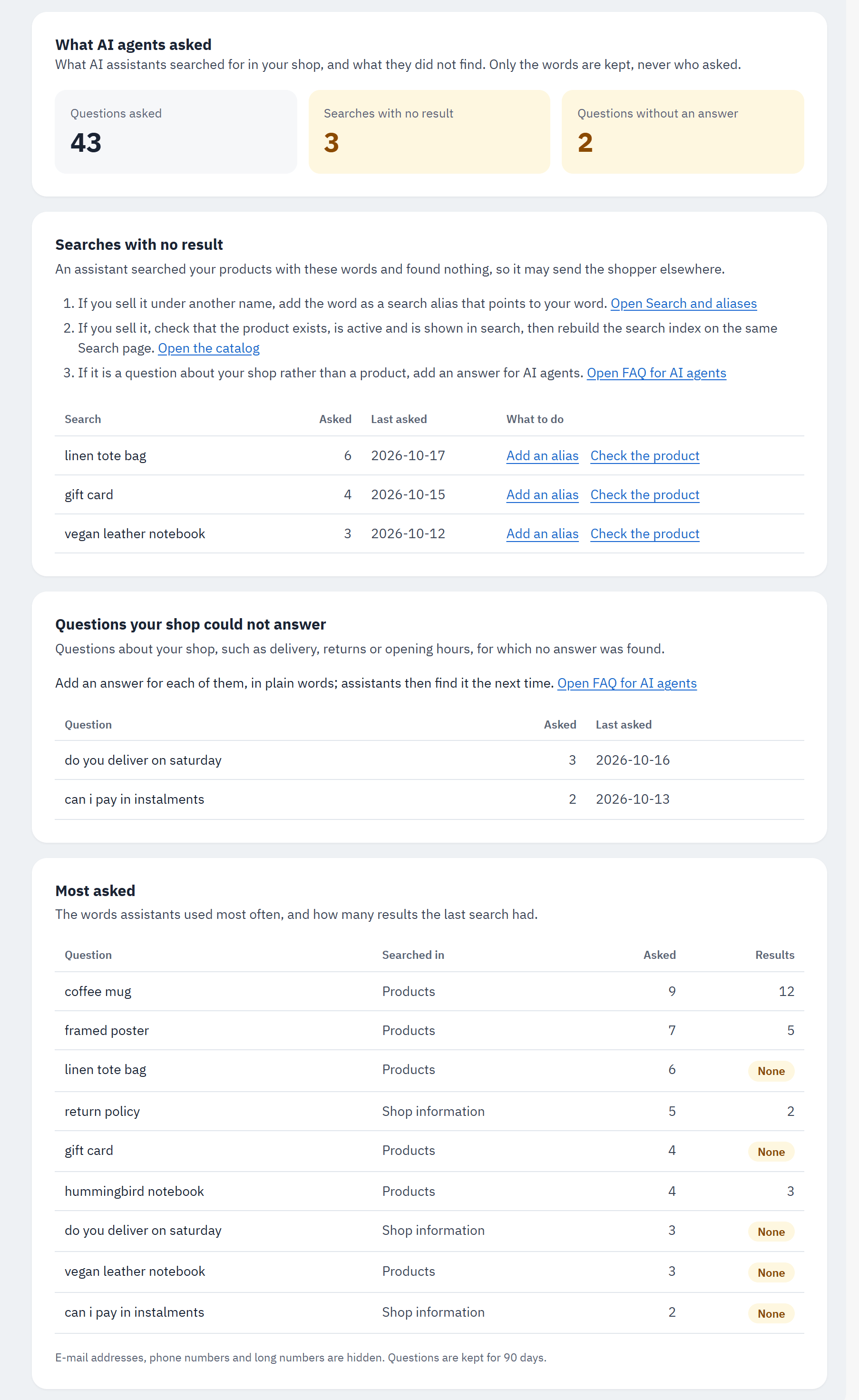
- The figures: Questions asked, Searches with no result and Questions without an answer.
- Searches with no result: the words an assistant searched your products with, and found nothing, so it may send the shopper elsewhere, with Asked and Last asked.
- What to do: Add an alias or Check the product.
- Questions your shop could not answer: questions about your shop for which no answer was found.
- Most asked: the words assistants used most often, where they searched (Products or Shop information) and how many results the last search had.
What to do with a search that found nothing:
- You sell it under another name: add the shopper's word as a search alias that points to your word (Open Search and aliases, Shop Parameters › Search).
- You sell it: check that the product exists, is active and is shown in search, then rebuild the search index on the same Search page (see The search index).
- It is a question about your shop rather than a product: add an answer for AI agents (Open FAQ for AI agents, see FAQ for AI agents).
A search leaves the list as soon as the same words find products again. Each list shows the 20 questions asked most. E-mail addresses, phone numbers and long numbers are hidden before anything is stored, and questions are kept for 90 days. The Dashboard's card AI insights shows the figures of the last 7 days.
Switching the reports on or off
Both reports are on by default. They have their own switch in the Logging card of Settings (under Advanced settings), per shop (see Settings):
- Record what AI agents ask: off, no new question is kept and the page says "Recording is off: new questions are not kept.";
- Count orders from AI assistants: off, no cart or order is marked, storefront pages no longer carry the script above, and the page says "Counting orders from AI assistants is off in this shop."
Neither stores personal data: a question is kept as its words per day, an AI order as its channel next to the order number (see Data and privacy).